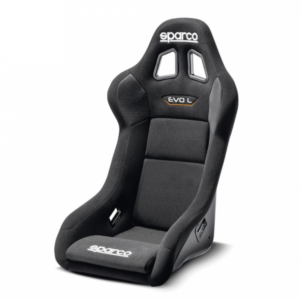
Putting a different seat in a SIM-LAB rig
The cockpit profile is adjustable, but the seat and brackets still need to meet at the right holes. Start with the exact SIM-LAB model and revision, then compare the seat drawing, bracket slots, profile spacing and hardware.
SIM-LAB currently says its bucket-seat bracket set mounts to 40 mm, 45 mm or 1.5-inch profile and has adjustable slider width. That covers many cockpits. It does not remove the check at the seat side or guarantee clearance for every shell.
There is no single side-hole number that proves every Sparco, OMP, Cobra, Corbeau or Sabelt shell fits the same bracket. Hole position, thread, bracket height, slot range and shell clearance all matter.
Check all three interfaces
The cockpit, bracket and seat each have their own drawing.
| Interface | Confirm | Do not assume |
|---|---|---|
| Cockpit profile to bracket | Profile size, slot access, T-nuts and bolt length | Every SIM-LAB revision has the same cross-members |
| Bracket to slider | Width adjustment, hole position and support | Any automotive runner drops straight in |
| Bracket to seat | Side-hole position, M8 thread where specified and shell clearance | All motorsport shells share one spacing |
| Seat to driver | Internal shape, padding and shoulder support | A nominal medium fits every medium driver |
Work from the manual for the cockpit you own. A second-hand frame may have older cross-members, extra profile or brackets from another maker, so the model name alone can be incomplete.
What the current SIM-LAB bracket set provides
Useful adjustment, with limits set by the actual seat and cockpit.
01Left and right plates
SIM-LAB lists two 4 mm aluminium brackets. Together they support one side-mounted seat.
02Profile mounting
The current page lists four M8 bolts for 40 mm, 45 mm or 1.5-inch profile. Use the supplied or specified hardware.
03Slider option
SIM-LAB says the slider-assembly width is adjustable. Confirm the selected variant and the current instructions.
Details checked on the current SIM-LAB bucket-seat bracket page on 4 August 2026. Follow the instruction manual supplied with the bracket and cockpit.
Choose for the driver and the available width
A rig removes road regulations, not pressure points.
Check on the driver
- Seated hip and thigh support
- Backrest curve and torso length
- Shoulder room without rolling forward
- Padding after a full-length session
- Wheel and pedal reach from the supported posture
Check on the rig
- Outside base and shoulder width
- Space for both bracket plates
- Bolt-head and tool access
- Clearance through adjustment range
- Headrest or wing clearance behind the driver
A sim-specific shell saves money where competition approval adds no value. A homologated seat can still make sense when the driver wants the same posture as the car or plans to reuse that exact seat. Keep the label and approved supports intact if future competition use matters.
Add runners for a reason
A fixed position is simpler; a shared cockpit needs movement.
Fixed bracket
Less movementBest once one driver is dialled in- Fewer joints beneath the seat
- Usually the lowest arrangement
- No quick change for another driver
Seat slider
Quick adjustmentUseful on shared rigs- Moves the whole seat without tools
- Can make entry easier
- Adds height and another part to tighten
Use a complete matched slider set and make sure both rails lock together. Support the rails as the cockpit and slider instructions require.
Set the seat before moving the screens
The seat angle decides hip height, reach and eyeline.
Set bracket height and recline
Keep the pelvis against the padding and support the shoulders without pushing the head forward.
Move the pedals
At full brake travel, keep a bend in the knee and stop the hips lifting out of the seat.
Set wheel distance
The shoulders stay against the backrest while the elbows remain bent through steering movement.
Tighten and mark the position
Use the specified torque, recheck after initial use and mark profile locations if the rig is dismantled.
Finish with the display
Move the screen or virtual eyepoint to the supported driver. Do not lean the body to suit an old screen position.
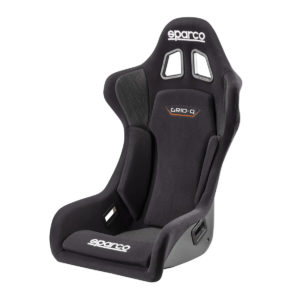
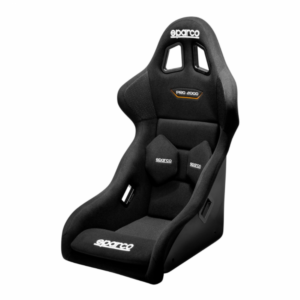
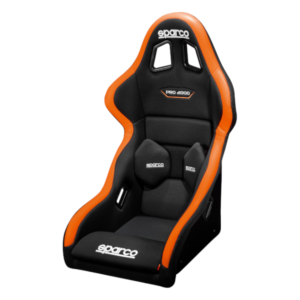
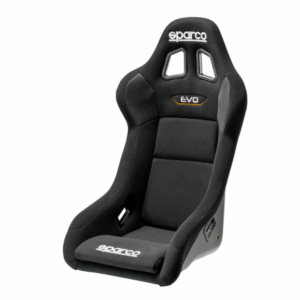
Seats and a model-specific mount
Check each product against the SIM-LAB bracket and cockpit you own.
-
From £458.40 Incl. VATFrom £382.00 Excl. VAT Select options This product has multiple variants. The options may be chosen on the product page

-
From £564.00 Incl. VATFrom £470.00 Excl. VAT Select options This product has multiple variants. The options may be chosen on the product page
SIM-LAB seat upgrade questions
Will any bucket seat fit a SIM-LAB cockpit?▾
No seat should be bought on that assumption. SIM-LAB describes its bracket set as adjustable for most cockpits, but the exact shell still needs compatible side holes, threads, bracket slot range and enough clear width.
Can I use motorsport side mounts instead of SIM-LAB brackets?▾
Possibly, if their slots join the exact seat to the cockpit profiles with suitable hardware and adjustment. Compare both drawings. A common motorsport layout is not a guarantee.
Do I need a seat slider?▾
Not on a single-driver rig once the position is known. A slider helps a shared rig and can make entry easier. It adds height and another interface, so support it as the cockpit instructions show.
Does the SIM-LAB bracket set include both sides?▾
The current SIM-LAB product page says it includes left and right 4 mm aluminium brackets plus M8 hardware for the seat and sliders. Check the variant and current contents when ordering.
Which profile sizes does the SIM-LAB bracket use?▾
SIM-LAB currently lists 40 mm, 45 mm and 1.5-inch profile mounting using four M8 bolts. Confirm your cockpit revision and manual rather than identifying profile by appearance.
Should I buy an FIA seat for the rig?▾
Only if you value that exact car seat, label or future reuse. A static simulator does not require FIA homologation. A seat moved into a car needs a fresh vehicle and regulation check.
How wide can the seat be?▾
That depends on the adjustable cross-member or profile position and the outside shell at base and shoulder height. Measure the usable rig width and leave room for brackets, bolt heads and adjustment.
What information should I send?▾
Send the SIM-LAB cockpit model and age, photographs of the seat profiles and cross-members, their clear spacing, the seat link and driver measurements.
We will check what joins to what
Include the cockpit model, approximate age, profile width, existing slider and the exact seat. Garreth or Cameron can then compare the interfaces instead of guessing from the rig name.
Browse sim seatsCall 0115 9893488Contact usSIM-LAB bracket source